

Walking is one of the simplest ways to become more active and stay in shape. This low-impact activity can bring not only numerous physical benefits, but also help regulate your mood and improve your mental well-being.
Using an app to start tracking your walks is a good idea, because it can make the experience much more useful. Depending on what you want to achieve, a good walking app can count your daily steps, record your route, offer detailed stats, provide structured training, or even give your workout a deeper purpose.
Here are the five walking apps worth considering, each aimed at a slightly different type of walker.
1. ActivityTracker — Best for Everyday Walking & Activity Tracking
Do you want to keep track of your everyday activity without necessarily turning walking into a complicated fitness routine? Then this is the perfect app for you.
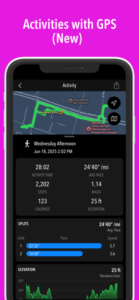
ActivityTracker focuses on the information most people actually want to see: steps, distance, active time, and calories burned. This iPhone and Android app automatically records your movement with the aid of your phone’s built-in motion sensors, preserving battery life. For dedicated walks, its Activities feature adds GPS tracking.
This way, you can manually start individual sessions, see your route on a map, and enjoy additional statistics, such as pace, elevation, splits, or heart rate (requires an Apple Watch).
ActivityTracker gives you the possibility to set a weekly target for the chosen fitness metric and displays a daily goal based on that target. You can receive progress notifications, AI insights regarding your activity for the current day, analyze your totals for each day, week, and month, and stay motivated through inspirational quotes. The app also allows you to share your activity route and stats with friends and followers on social media.
Who is it for? ActivityTracker is particularly suitable for people who want a clean, straightforward pedometer for everyday use, while still having the option to record a proper GPS walking workout. It works especially well if your main goal is simply to become more active and monitor your progress over time.
2. Walkmeter — Best for Detailed Walking and Hiking Workouts
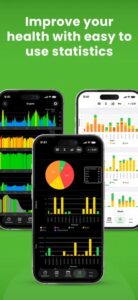
Walkmeter takes walking considerably further. This is basically a complete fitness computer for your phone, with maps, graphs, splits, intervals, training targets, and a wide array of statistics.
The app primarily uses GPS to record outdoor workouts, but it also incorporates information from your phone’s internal sensors. You can monitor various stats, from your distance and pace to elevation, heart rate, and cadence.
Walkmeter allows you to configure audio announcements to hear your results while walking and provides support for interval training and customized workouts.
With this app, you can view terrain and traffic maps using Google Maps, use turn-by-turn navigation, and record temperature and weather. Walkmeter places a great deal of importance on your privacy and security. In that sense, it lets you share your location, path, as well as fitness results with friends and family.
Who is it for? This is a good choice for walkers and hikers who want detailed statistics and more control over their workouts. If you enjoy analyzing your routes, comparing different walks, or following structured training sessions, Walkmeter offers much more depth than a basic step counter.
3. Google Health — Best for Tracking Your Overall Health & Fitness
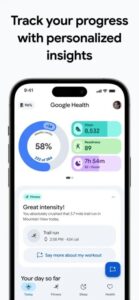
Google Health (former Fitbit app) functions as a comprehensive tracker for monitoring overall wellness and daily activities.
The app can track essential walking stats, such as steps, distance, and calories without requiring another dedicated fitness tracker. At the same time, it can bring together relevant information from compatible apps and devices, giving you a broader overview of your sleep, fitness, nutrition, and overall health.
Google Health takes advantage of your phone’s sensors to automatically record your movement. Optionally, you can enable GPS and begin a separate walking workout. This way, you’ll enjoy additional stats, including duration, heart rate zones, and cardio load – when paired with a supported wearable.
The app does a good job at tracking your activity and offers custom AI fitness plans, built with Gemini.
Who is it for? Google Health can be regarded as a general health-tracking solution rather than a dedicated walking app. This is ideal for anyone looking to incorporate walking into a general wellness routine, rather than those seeking a specialized, walking-focused program.
4. Charity Miles — Best for Turning Walking Into a Good Cause
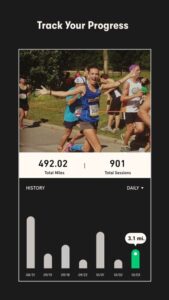
Charity Miles takes a different approach: instead of making statistics the main motivation, it connects your walks with charitable causes. How does everything work? Basically, the app allows you to earn sponsorship money for various charities by walking, running, and cycling.
Charity Miles lets you select an outdoor or indoor walk, depending on how you’re exercising. For outdoor walking, the app uses your phone’s GPS to measure distance. For indoor walking, it uses the device’s motion sensors. There’s also a pedometer mode available, which can get activity data from Apple Health or an Android phone’s pedometer.
The app allows you to choose from a large selection of charities and keep track of your personal contribution over time. It can be used for individual activities, as well as challenges and group-based campaigns, adding a social element to the experience.
Who is it for? Charity Miles is a natural fit for people who find motivation in having a purpose beyond their own fitness. If knowing that your miles can contribute to a charitable cause makes you more likely to go for another walk, the concept can add an extra reason to stay active.
5. Walking for Weight Loss — Best for Structured Weight-Loss Walking Plans

Walking for Weight Loss is less about simply recording how many steps you take and more about telling you how to walk. This app provides a three-month interval-walking program with different difficulty levels, making it possible to start with shorter, easier sessions and gradually increase the intensity.
Audio guidance is available, allowing you to follow the workout without constantly looking at your phone.
Walking for Weight Loss combines faster and slower walking intervals and can be used both outdoors and on a treadmill. During outdoor sessions, GPS records the route, while the app tracks metrics like distance, time, pace, and calories. The app provides workout reminders, customizable music integration, and a training calendar that helps you keep track of completed sessions.
Who is it for? This app is aimed at people who have a specific weight-loss or fitness goal and would rather follow a ready-made walking program than create their own workouts. Beginners can choose an easier level, while more experienced walkers can select more demanding sessions.
Please follow and like us: